
Build A Golem Controls and HUD
Every icon on the launch screen, including the Settings gear people miss for codes.
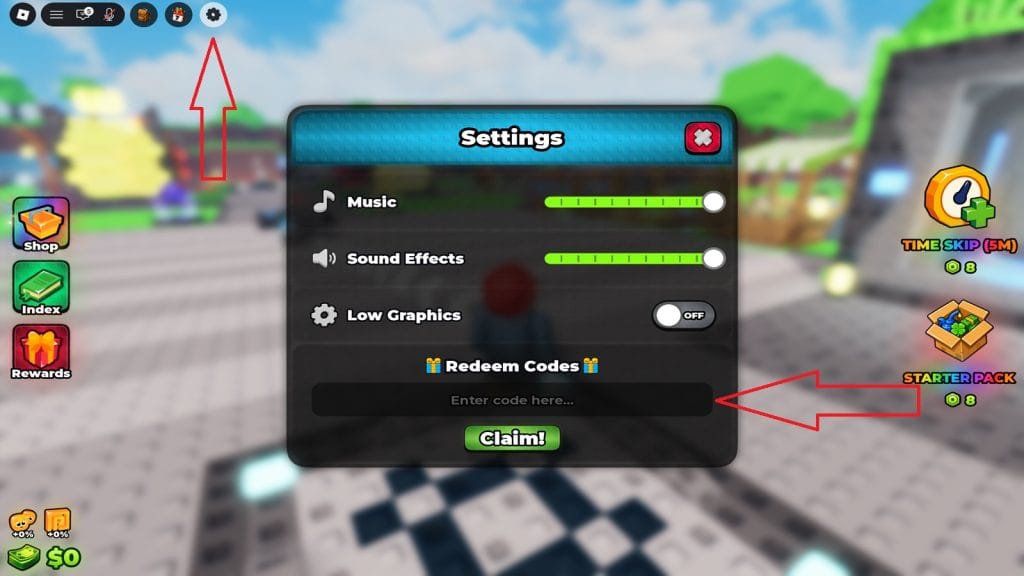
Build A Golem uses a standard Roblox character plus a custom HUD. If you cannot find codes, you are looking at Shop. If you cannot find parts you already rolled, you are ignoring Index. This page is a map of the launch interface shown in official screenshots: tiled spawn, stone crafter, left icon stack, right Robux packs, bottom-left Cash and luck.
Movement is default Roblox. On keyboard: WASD to walk, Space to jump, Shift to sprint if enabled, right mouse to pan, scroll to zoom. On mobile: thumb stick plus jump. On console: left stick move, right stick camera. There is no unique combat hotbar. You are not slaying golems — you are assembling them.
Top-left cluster
Four circular buttons. The gear is Settings. Open it for Music, Sound Effects, Low Graphics, and Redeem Codes. That is the only official code path. Full clicks live on how to redeem.
Low Graphics is worth toggling on busy islands. It does not disable mining ticks.
Left stack
Shop — crate icon. Spend Cash on rolled parts and inspect Robux offers. Not the code box.
Index — book icon. Collection log of parts you have seen. Use it before you sell “junk.” Details: Index hub.
Rewards — gift icon. Playtime or milestone claims. Check it once per session. It will not contain RELEASE.
Right stack
Time Skip (5M) — Robux skip, shown at 8 Robux on the launch HUD with a gold coin art. Optional. Free skip is the THANKS code.
Starter Pack — Robux crate, also tagged 8 Robux at launch, illustrated as a box of bits. Optional. Redeem RELEASE first.
Bottom-left meters
Your avatar face, a luck percentage, and Cash. Luck at 0% means the shop is still rolling commons. Cash is the only spend currency for parts. If Cash does not move after placing a golem, the body is not on a plot — return to how to build.
Crafter camera
Stand on the stone disc to assemble. Zoom out if slots clip into the cyan lights. On mobile, rotate the camera so the confirm button is not under your thumb stick. There is no separate “build mode” key.
Quality of life
- Turn music down in Settings if you are reading this wiki in another tab.
- Low Graphics helps on phones when several crystal miners glow at once.
- Server size is 6. You will see other players’ miners. They cannot steal your plots.
- If the HUD vanishes, rejoin. Do not reset blindly while a Time Skip is running.
What you will not find
No COD_ button. No Trello key. No chat redeem. No emote wheel required for crafting. Army-game muscle memory does not apply. If a video shows a white code button on the right edge, it is the other title.
Camera on console uses the right stick; if the crafter disc clips into the cyan lights, nudge the stick until every slot label is visible before you confirm. On a laptop trackpad, two-finger pan works the same as right-mouse drag. None of these camera habits change Cash/s — they only stop you from assembling a headless miner because the confirm button was off-screen.
After you know every icon, run the starter checklist once, then ignore this page unless a patch moves Settings. Patch notes will sit on updates. If a friend sends a screenshot with a COD_ button, they are not in this HUD.
Frequently Asked Questions
Quick answers for rolling parts, crafting golems, and claiming cash.
Where is Settings?
Top-left gear, last of the four round buttons.
What does the book icon do?
Index — your part collection. It does not redeem codes.
Are Time Skip and Starter Pack codes?
No. They are Robux shop products. Promo keys go in Settings.
Can other players use my crafter?
You share a server of six, but plots and inventory stay on your account.