
How to Redeem Build A Golem Codes
The code box lives in Settings, not Shop, Index, or Rewards.
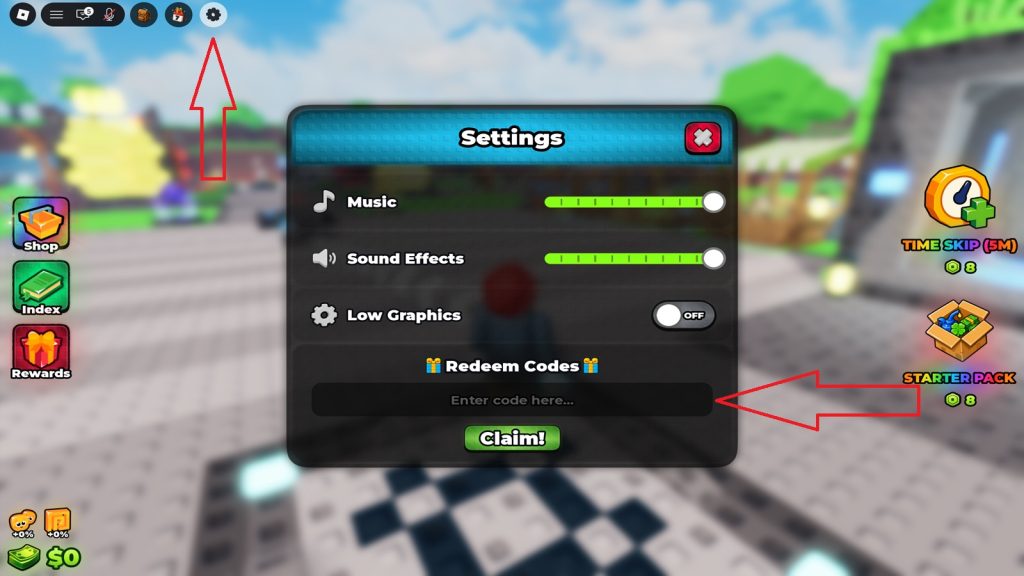
Players miss Build A Golem codes because the box is tucked under audio sliders. There is no COD_ button on the right like Build a Golem Army. There is no chat command. You open Settings, scroll, type, and press Claim!. This page walks that path with the HUD you actually see after the tutorial: a gear in the top-left cluster, Shop / Index / Rewards on the left, Time Skip and Starter Pack on the right, Cash and luck in the bottom-left.
Redeem RELEASE and THANKS before you spend Robux. The codes hub lists rewards. This page is only the clicks.
HUD map before you click anything
Top-left: four round buttons. The gear is the last one. That is Settings.
Left stack: Shop (crate), Index (book), Rewards (gift). None of these accept promo keys. Index tracks parts you have seen. Rewards is daily or milestone loot. Shop sells Robux packs.
Right stack: Time Skip (5M) and Starter Pack, each tagged at 8 Robux in the launch HUD. Those are purchases. Typing their labels into Settings does nothing.
Bottom-left: your face, a luck percentage (often 0% on a new file), and Cash. After a good Claim!, Cash jumps. Luck does not.
Exact redeem steps
- Launch Build A Golem and wait until the stone crafter and plots finish loading.
- Complete the short tutorial if this is a new slot. The gear stays locked or hidden until the HUD is live.
- Click the gear at the top-left.
- Read the Settings card: Music slider, Sound Effects slider, Low Graphics toggle, then Redeem Codes with an empty field that says Enter code here…
- Paste RELEASE or THANKS with no space before or after.
- Press the green Claim! button.
- Close Settings and look at the Cash counter or the Time Skip timer.
Claim one key at a time. If you mash both into the same field, the game treats it as a garbage string.
What success looks like
RELEASE adds 75,000 Cash. The bottom-left dollar value ticks up immediately. Spend it on a full set of parts, then snap them on the crafter.
THANKS applies a 15-minute Time Skip. You should already have a golem walking a plot. If every plot is empty, you skipped fifteen minutes of nothing. Place a miner from getting started first, then claim THANKS.
Common failures
Typo. Codes are case-sensitive. release and Release can fail. Use RELEASE and THANKS exactly as listed on the codes hub.
Wrong game. Army keys, Grow a Garden strings, and universal “FREE100K” lists will fail. This place ID is 78091651370612.
Already used. Each Roblox account redeems a key once. Alts are a terms risk; we do not recommend them.
Expired. None are archived yet. If Claim! suddenly rejects a string that worked yesterday, it died. Check more codes and Discord.
Low Graphics / audio. Toggling those options does not block codes. Keep scrolling.
Mobile tap miss. The Claim! button sits under the text field. If the keyboard covers it, dismiss the keyboard, then tap Claim!.
After a successful claim
Do not roll ten commons because you feel rich. Open the parts tier list and buy a matched set. Dirt bodies exist to teach the crafter. Crystal and later cores are the Cash engines. If luck is still 0%, read luck rolls before you dump the entire 75k on the first shop refresh.
If you prefer a checklist on one screen, use the starter checklist. For the next free string, watch the Discord codes channel and return here after every update listed on launch notes.
Frequently Asked Questions
Quick answers for rolling parts, crafting golems, and claiming cash.
Where is the code box in Build A Golem?
Settings gear, top-left. Scroll to Redeem Codes under Low Graphics, then Claim!.
Can I redeem on mobile?
Yes. Same gear. Dismiss the keyboard if it hides Claim!.
Does Shop redeem codes?
No. Shop sells Time Skip and Starter Pack for Robux. Promo keys only go in Settings.
Should I redeem THANKS before placing a golem?
No. Place a miner first so the skip advances real Cash ticks.